Have CDs had their day? What are the lessons for Enterprise IT?

In the late 90s had dinner with Dave Crocker, the original author of RFC 822 and so a founding father of Internet Mail. He said it never ceased to irritate him when people said how amazed they were that e-mail had been adopted so quickly by companies, since RFC 822 had been published in 1982 and he had personally been working on getting e-mail established for over 20 years.

We see this model over and over again. Things seem to happen overnight with hindsight, but for those who have been paying attention they have been evolving for years. Mike Zisman, who used to lead Soft-Switch and then Lotus, once wrote a paper on “Timing is Everything” which discussed the frustration of having technology ready before the market is ready, and the magic that happens when everything lines up.

I was reminded of this when I saw the Which? Conversation survey Have CDs had their day? asking if people buy CDs in music shops, buy CDs online, mostly use free streaming services or buy digital downloads from online music stores. I didn’t feel that I could really respond to the survey, as the answer was “all of the above”. Here is the comment I posted:

“They are complementary. I still by a small number of CDs each year – less than I did in the last century, but it hasn’t changed so much in the last 10 years since I started using online services. The limiting factor is that I don’t want to store more CDs. I buy absolute favourites because of the pleasure of owning them. But I have to like many tracks off the album – the big difference now is I can get familiar with the whole CD before deciding whether to buy (I was frustrated by the number of CDs I have from the 80s and 90s from which I only really want to hear one or two tracks – but ripping fixes that).


When I buy, I do it from good record shops if I can – primarily to support them. The best I know is Ludwig Beck in Munich. The CDs are in the cases on display, and there are lots of players around so you can listen first. A great variety of music, quiet atmosphere, space. I will go out of my way to go there and find things to buy. The UK music chains don’t generate the same loyalty – it’s mostly “fast food” retail. I occasionally pick a CD up at the airport, but wouldn’t go out of my way to purchase there. So, unless I can get to a good record shop I purchase online.


Streaming: sure. A good way to find out if I like just the track, or the whole CD, and other stuff the artist does. But mostly for research – the majority of background listening is still Radio. In both cases, advertising supported seems to work (I love the BBC model, but more for speech, or the thinking behind it, than music). Online purchases: yes. As mostly I only want to own one or two tracks off an album. A lot of my listening is done on the iPod/iPad when travelling, so that’s my favourite way to access all my music (including ripped CDs). I just top up my collection with purchases – but over time that is going to become a significant proportion.

Which led me to think about technology adoption and how it changes consumer behaviour – since the users’ behaviour and the organisation’s ability to change the way they work are a key influence in the adoption of Social Business. The complexity of the intersecting technologies, each on their own timeline, made the changes in the music industry complex. The Internet came along. The mp3 standard came along. Music players came along. Web commerce came along. Streaming technologies came along. At some moment in time, Apple came along and did the right thing at the right time to change an industry. And now social networking is looking to influence how this ecosystem evolves. The users went for the mix of solutions that best met their needs at each specific moment in time – rather than just neatly adopting the next solution in the series as they had before (78, LP, CD, …). Meanwhile the industry spent all its efforts fighting the inevitable, instead of leading the way to the future.

IT teams that try to delay the adoption of Social Business in their organisations are going to suffer the same fate. If they don’t take a leadership position in explaining the value to the business, then they are going to suffer unpleasant consequences – whether that comes from losing their influence as more enlightened management is put in place above them, or even being rendered irrelevant by a move to commodity Cloud services by the business.
 

Cooking up a Story

A couple of people have asked what my last blog post had to do with collaboration. Well, to be honest, not a lot. But it illustrates something I often discuss. The difference between knowledge and information.

To me, knowledge is something that exists in someone’s head. Its about knowing something. The term “knowledge management” irritates me, because it is usually applied to techniques for managing information that happens to be sitting in a computer somewhere.

The difference between information and knowledge is the difference between having a recipe for a dish and knowing how to cook things.

Now, one could argue that they both lead to the same thing – a hopefully delicious meal.

But the Accidental Recipe post was all about cooking when you do not have a recipe. Using the knowledge that comes from the practical application of many recipes to create a delicious meal from ingredients that don’t make up a recipe possess. Innovation, not the application of a known process.

Knowledge workers could go and read all the information in all the information repositories, then practice applying them a lot and, hey presto, they can solve the business problems they face each day.

Where social software platforms differ is that they strive to provide access to knowledge, not to information. One way they do that is by letting you discover information in the context of the people who are sharing it. So you not only have access to the information, but also the people who can answer your questions, advise you and help you to apply the knowledge. “Knowledge on Demand.”

The second difference with social platforms is that they actively encourage users to share, not just information, but also experiences.

I am not sure that this blog post contains much useful information, but hopefully it imparts some useful knowledge to those who read it.

An Accidental Recipe

I love it when meals come together by accident, and taste delicious. Today I wanted to use up some ingredients that have been in the fridge since before the Christmas holiday. Quite a few carrots, a shallot, a few cherry tomatoes, half a yellow pepper, some left over lemon thyme, a lime, a quarter of a small bottle of (M&S) sweet Chilli Sauce. So over lunch I bought an organic salmon tail from the fishmonger.

First cut halve the carrots then cut them into thick strips. Heat rape seed oil in a (preferably Le Crueset) wok (I love mine, it is my favourite way to cook) until smoking and add one shallot, a little diced ginger and the leaves of the lemon thyme. Meanwhile put a handful of pasta spirals (per person) on to boil. Skin the salmon tail, halve it down the middle and cut into strips across ways. Fry quickly in the flavoured oil, turning continuously for 5 minutes. Add the cherry tomatoes (quartered) the yellow pepper (in strips) and carrots. Add the juice of a lime, a large teaspoon of honey and the sweet chilli sauce (with a little water to rinse out the bottle). Season with black pepper to taste.

As soon as the pasta is cooked, drain it and throw it in. Voila.

As we had just a little Tartare Sauce left in a jar, we stirred a teaspoon of shredded horseradish in with it as a accompanying sauce. It seemed to work.

Delicious. I’ll probably never accidentally cook it again, but I can imagine treating it as a recipe!

Driving the Adoption of Social Business

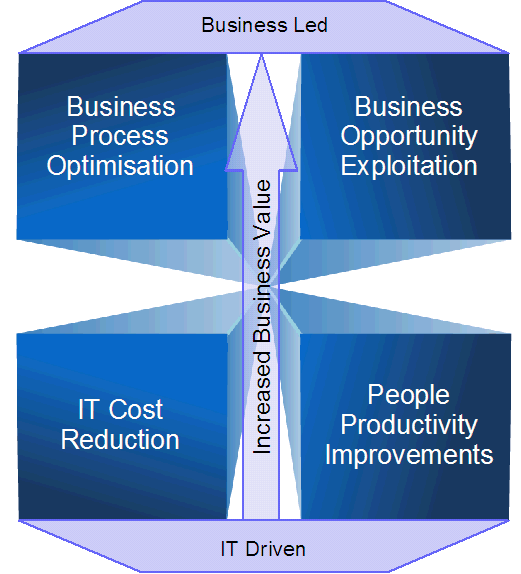
I was recently putting together a chart for a client to help them understand how to build a business case for Social Business. I started with this diagram:

Unknownname

Which led naturally to consideration of the difference between the traditional approach to rolling out collaboration and the IBM Collaboration Agenda approach. As I said in the accompanying presentation:

Business involvement in creating a social collaboration solution is key to its credibility with the business and the end users.

  • IT led Social Business projects tend to fail or stagnate
  • Business led Social Business projects tend to succeed

Which doesn’t invalidate generic cost benefits like reduced e-mail traffic, lower telephony costs and less travel (these are measurable benefits that can help justify deployment costs, if nothing else) but highlights the fact that the real limit organisation’s have on new initiatives tends be be around management bandwidth and short term expenditure, rather that whether there is a long term return on investment, Ultimately management will invest effort in projects that deliver more revenue or improved customer satisfaction, rather than those that might "improve employee productivity" (this is the "selling vitamins vs. selling pain killers" discussion that Louis Richardson used when I presented on the business value of social software with him at the Portal Excellence Conference 2010 in Dusseldorf recently).

0unknownname

Ultimately, business cases are therefore more compelling if they either deliver collaboration enabled business processes or leverage social media to improve the customer experience and increase sales. This is why the IBM Collaboration Agenda focusses on delivering industry specific and job role specific value via social business tools (like social software and unified communications).

Incidentally, I completed this diagram by highlighting the internal and external aspects of Social Business.

1unknownname

I was reminded of this only this morning while participating in the IBM internal Technical Consulting Group session discussing future use of Collaboration within IBM in the UK. The team just completed a study of IBMers view of their adoption of, and needs for, collaboration tools.

One of the things that became very clear in this study, was that social collaboration adoption varied significantly by job role. Typically, customer facing staff used social software less in their job, while delivery and back office workers used it more. This may be partly due to better accessibility for desk based than mobile workers (and area where we still have deployment work to do), but I believe the more significant factor is the differences in the way they work. Customer facing teams are more face-to-face, telephone, e-mail, instant message focussed, while back office workers are more meeting, collaboration space, repository (but, still, e-mail and instant messaging) focussed.

Stuart’s first law of social software adoption has always been that its use must provide a benefit both to the organisation (to justify the investment) and the user (to drive usage). This isn’t just about "sharing stuff is good because being able to search for stuff other people share helps me in my job"; it is about a much more selfish "if I take time to share this now, I get this benefit immediately".

So the TCG team refined my general "benefit to the user" statement and came up with three phases or barriers which must be navigated for an individual to become a committed user of social software:

  1. Will it bring me a benefit (and what is that benefit)?
  2. How do I use it (and is it easy for me to integrate into the other tools I use)?
  3. Should I adopt it as part of the way I work (which needs the communities I work with to adopt it too)?

What this discussion made clear to me is that what the user needs to overcome each of these obstacles is user (or job role) specific. When you think of business adoption, you cannot rely on one set of messages to apply to everyone – you have to adapt them to the audience.

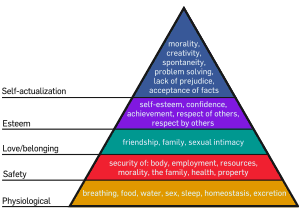
Interestingly, Jon Machtynger brought up Maslow’s Hierarchy of Needs in the discussion:

2unknownname

Which is probably an interesting way to refine these thoughts further. I am sure we will be considering this more in the coming weeks.

Apple iPad or Samsung Galaxy Tab?

Passing through Heathrow today I got my first chance to play with a Galaxy Tab in the duty free. Pretty impressive. There was no Internet connection, but even without I couple pay with it enough to be convinced it is a cool piece of kit … and that Android is a good platform for Tablets.

Fast, easy to use, a nice form factor (it felt a bit cramped after the iPad, but for a "one window at a time" type device I think the screen is big enough) and highly functional with all the capabilities you would expect (and if the iPad was a phone, perhaps I would not be so resistant to buying a second SIM for it).

As I left the shop, I passed the Apple section and a different adjective popped into my head. The Galaxy is functional, easy to use, effective, useful. The iPad is beautiful.

Practically, I do not think there is much difference which platform you commit to. It is emotionally that the iPad gets you. So are you ruled by your head or your heart?

More thoughts on the iPad…

A colleague who read my iPad posts, asks:

1) Would you use an iPhone as well as an iPad or could you get away with an iPad a simpler smartphone / phone? .

Strange you should ask that. I was wondering it myself the other day. Especially as I have a BlackBerry that is perfectly adequate for most purposes, several Nokia eSeries devices I could use instead, and an Android phone I would really like to find time to play with – so why would I get an iPhone too (especially as I didn’t actually pay for any of those other devices). Yet I still find myself tempted every time I see one.

One challenge is: I don’t always want to carry a bag – and the iPad doesn’t fit in my pocket. If I don’t go out expecting to use the iPad (e.g. going to the coffee shop to catch up with my social network or read the newspaper) then I don’t always want to carry it with me. But there is almost nothing that the iPad doesn’t do better than an iPhone would … well, apart from making calls of course … and taking photographs … and videos … and fitting in my pocket.

So, I would use the iPad for preference when I am carrying both … but I would carry an iPhone when I would not carry an iPad.

Let’s face it … (sacrilegious though it is) … one SmartPhone is pretty much as good as another for most purposes. It’s like deciding whether you want a basic BMW 3-series, or an M3 (or, indeed, my old 840). Who wouldn’t want the M3? But the reason for choosing it instead has nothing to do with getting from A to B.

Image … Brand … Style … and that warm feeling inside that I used to feel when I came round the corner and saw my 840 sitting there waiting for me. It was summed up in the MasterCard advert … Priceless.

Of course, the BlackBerry or Android or some of the Nokia Smartphones have their own brand image too … and it is going to be really interesting to see what RIM can do with the "BlackPad" and Nokia when their Tablet devices appear … as well as what innovative startups can do with Android on Tablets. Each will have its own brand image … and appeal to people wanting another style.

The iPad is really my only Apple device. There is a MacBook sitting on the table … but I bought it for M not me. There is a lifestyle decision to be made – buy into the Apple brand proposition, and then it make sense to be MacBook and iPhone and iPad (and Apple TV and ….) But you need to accept that it is a form of (voluntary) lock-in. An easy life. Devices that just work … and work together.

I don’t mind that – after all, given the choice (and ignoring cost) I would always buy BMW, or a Bang & Olufsen…

But there is a little devil sitting on my shoulder screaming about openness too. I don’t care about that in cars, or Hi-Fi’s – there I am just a user – but I do care (a little) when it comes to IT.

So I probably wont buy 100% into Apple until I retire.

Until then … it is hard to justify investing in an iPhone when I could do 80% of what I would do with it on an iPad plus any of the SmartPhones in my drawer.

So I won’t invest my own money in a work MacBook either (… but if IBM ever offers to buy me one, then I will jump at the chance!)

2) How does the iPad fit in with the IBM LN Traveller? See also IBM iPhone special offer!

Lotus Notes Traveler support the iPad.

It uses the built in e-mail/calendar/contacts client (basically the support Apple built in to talk to Exchange). So the existing support Notes Traveller had for the iPhone exploits the iPad perfectly. Like the iPhone, the iPad supports multiple mail accounts, and these exist separately from (but in parallel to) any private mail accounts. So you can switch between private and business inboxes as you wish.

I am not sure what IBM UK will offer for employees wanting to access their e-mail from a privately owned Apple devices. I am hoping that once the service is up it will be open to everyone, not just people who subscribe to the IBM-Vodafone iPhone scheme. In which case it will just work with the iPad.

You will need to install a security profile on the device to confirm to IBM Security rules (password strength, automatic locking, etc.), and I am not sure how device wipe will work on an iPad. Initially the service will probably be limited to e-mail access, due to some security concerns about allowing generic w3 access (which would allow use of Lotus Connections, Lotus Sametime, etc.) But I am hopeful that we will find a way to relax that over time.

The IBM CIO’s strategy is clearly to allow private Smartphones to be used for business purposes. This is a natural extension of the existing strategy that most IBM employees use home broadband so it does not make sense for IBM to pay for it. Similarly, most employees will want a personal Smartphone, so it makes sense for IBM to allow them to use that instead of dictating and funding a SmartPhone choice. This is already permitted with personally funded Apple laptops.

3) Can you conjugate an APPLE device?

Absolutely (or rather, my son can – he is the Latin expert in the family … I didn’t learn Latin at school).

Hence I am iPadding a blog post now while the lady at the next table iPhones the web to research the MiFi device I told her about, and a few of weeks ago I iPadded this post about my PaddyBag.

The iPod Touch is a but harder to conjugate however (and, I still think, a branding aberration by Apple).

Unknownname0unknownname

My iPad, My Way with MiFi

I’ve had my Vodafone MiFi adapter for just over a week now, so I thought it was time to write about it.

(For non-geeks in the audience, MiFi is a like a personal WiFi hot spot. Or like a mobile phone with no keypad/microphone/speaker that can act as a Wireless LAN hot-spot. It uses a SIM Card and 3G connections to provide the Internet connection. So you can connect your iPad to it and get online – without needing any physical connections at all – just wireless).

When I originally got the iPad I decided to go MiFi instead of going for a 3G enabled model. That way, I only need one SIM (and fee) and get WiFi access from my various laptops as well as the iPad (a colleague even accesses his MiFi from his Smartphone as the phone blocks VoIP over 3G – but it works if he goes via the MiFi.,

The Vodafone device is very sleek (in fashionable iPod white), and about the size of a deck of playing cards, as they say (maybe a bit smaller, and not so thick). So ti slips easily in the pocket or bag, and then you can forget about it (as all connections are wireless). As soon as I had recharged it (mini-USB connector, the same as my BlackBerry and Plantronics Bluetooth headset – that is great as with one adapter (from the iPad) and two cables I can recharge (and connect) all my gadgets when on the road, Vodafone claims 4 hours use from one charge (which seems to match my experience). And you can trickle charge it (or keep it charged) with a USB connection to the laptop (and in that case, you can turn wireless off as it connects via the USB using the software provided).

Unknownname

Having set it up (and defined an SSID and pass phrase), I connected via Wi-Fi from the Ipad, my Tablet PC (Windows XP), my Acer Aspire Netbook (Ubuntu) and even my ThinkPad (Windows XP – that took a PC reboot, but it had been running for quite a while without a reboot and its wireless LAN tends to get confused, in my experience).

It just worked. Without fuss or problems. And has ever since.

I am just as irritated as ever that 3G is not reliable on the train (I have the same problem trying to Twitter from my BlackBerry), but it is great to be able to whip out the iPad and be online. I used Google Maps with Location Services to find my way to the station through Cambridge last week (is that using GPS in the iPad or the MiFi – I am not sure – the thing is, it just works!).

The device also takes a MicroSD (not provided – fortunately I had a spare) and from a browser you can upload files which anyone connected to your hot-spot can then download (I am sure there is a use for that, but the HTTP upload/download process is a bit cumbersome – it is a shame it doesn’t just appear as a USB device on your PC desktop when tethered).

So, overall, 5 stars – it does exactly what I wanted, very simply.

Getting Stuff Done

I just came off a call with Rashik Parmar and a small group of IBM colleagues who are thinking about how we can make our colleagues more effective in the way they collaborate by reducing the volume of e-mail they receive and need to process. Anyone familiar with Luis Suarez and his personal project A World Without E-Mail.

Based on work Rashik has done in this area, we are starting on a personal three part exercise:

  1. Filter: Automatically categorise routine mail and place it in folders suing rules. Unsubscribe from mailing lists you do not need and switch to an RSS Reader where that is more appropriate.

    Automatic categorisation makes perfect sense for me as it mirrors what I already do – manually moving such mail to a “To Read” folder when doing my initial pass through my mail, and going and reading it later (if and when I have time) – even if I know there are many messages I will never go and read, it is simply psychologically easier to file them that to delete them. Automatic filing via a rule is often also easier than unsubscribing.

    Personally, I plan to try categorising this mail into a number of folders – since that is just as easy for the rules, but it makes it easier to differentiate mailing lists that I really should go and read (but not now) vs. lists that are interesting (but I don’t really have to read) vs. those which are on a topic I don’t care about now (but might care about at some point in the future – and may want to catch up with then).

    Note that automatic filing does not reduce mailbox size – but I don’t have a problem with that as a combination of automatic filing of attachments and automatic archiving of old mails keeps my mailbox size under control (if not the archive size!)

    I have to admit, I have never really got on with RSS Readers. Part of the problem is that they become a second inbox – and (for me) needing to check two places is worse than overloading one. The Notes inbox has lots of tools (folders, flags, rules, archiving, free text search, swiftfile, … and even a form of tagging) for handling everything that comes in, and I am dissatisfied with having to cope with another way of doing some of that. So my history is littered with RSS readers I used to subscribe to a bunch of content, and then neglected. But maybe I will try again.

  2. Learn. Think for each e-mail: is an e-mail the right way to respond to this, or should I Sametime or Phone – or Blog and answer and send a link.

    It is important to realise that different people prefer different communications mechanisms. Personally, I don’t like telephone conversations – there is no “click to add to Activity” button, and having to take notes every time just adds to the effort required (thank goodness for my headsets!) Maybe if my memory was better it would be different. But there are people (why is it mostly salesmen?) from whom I never get e-mails, just voice mails (fortunately delivered to me as e-mails!)

    I already try to prune copy lists when I Reply All (and, of course, omit the attachments), and I use Sametime a lot. I will try to increase both of those things, and also try hard to blog responses when that is possible (although it still seems to me that I spend far too much of my time working without an effective network connection – we really need to figure out how to make wireless access work effectively on trains and finally deliver access on planes).

  3. Switch. Use Activities more instead of e-mail threads. Use Connections more for Collaboration overall.

    Yes, that suffers from the Offline problem too… and even more from the “another inbox” problem. I need far better tools to manage the 75 Activities currently on my active list. So I will have another go with taking selected Activities offline (I gave up because Notes 8.0 had definite restrictions in that area – which are hopefully fixed now).

    But there is still a little voice in the back of my head reminding me that the effort required to click on the link in a notification about an updated Activity is definitely a drop in productivity compared to reading an e-mail – especially as, in many cases, it is not clear from the Activities Notification exactly what the sender expects me to do. I think we need to work on promoting best practices for use of Activities too (a reminder that I put that project on a To Do list once, but never got around to doing anything about it).

    Incidentally, if we were inventing Activities now, would we still allow the inclusion of files in Activities – shouldn’t all be in Connections Files and linked from the Activity? What is needed is a dialog to upload a file to Files from the context of Activities.

So: Phase 1, analyse how much e-mail I receive each day during this week (to define the “from” state”. Phase 2, implement the steps above. Phase 3, evangelise the success I have to colleagues and co-workers.

It was really interesting in the discussion that “Getting Things Done” is clearly a great source of ideas for steps to take – although many people (me included) would find it difficult to move over to a structured mechanism like that. It is valuable as a source of inspiration and techniques, but what we need are a series of success stories that can inspire others and role models who can educate their colleagues rather than some sort of formal process to be adopted (Phew! Let’s hope we can avoid someone deciding to build a formal process out of this!)

Maybe I can get some traction around the mre vague concept of “Getting Stuff Done”.

The Evolution of Cloud

Throughout my career I’ve tried to find opportunities to work in emerging technologies. First Computer Telex, then Computer Fax. Later E-Mail interoperability, Unified Communications and Mobile & Wireless. Followed by Social Software. All emerging technologies in their time.

Last night, over a pint of Guinness, I was discussing with a colleague why I think Software as a Service solutions are one of the most exciting things to be working on in IT today – even though there might seem to be more buzz around other forms of Cloud Computing.

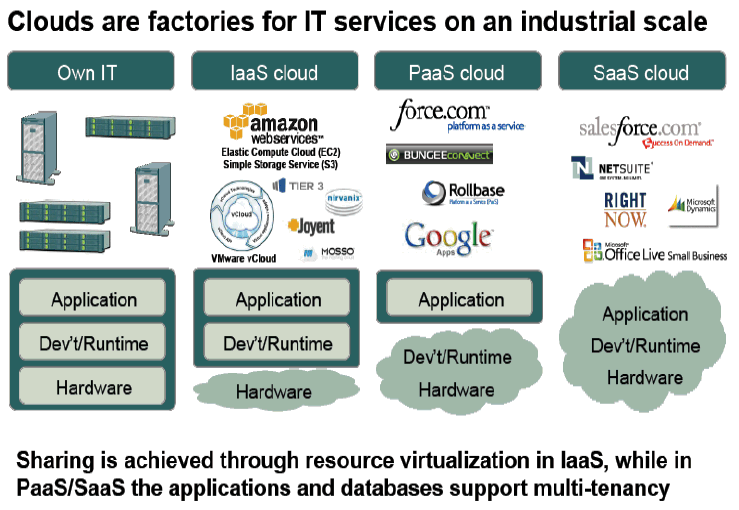
Earlier this year I presented a Cloud Computing Tutorial & Introduction Workshop at the Kuppinger Cole Cloud 2010 Conference in Munich, where used a chart – borrowed from Sajjad Khazipura (of Wipro Technologies) at the Storage Developer Conference in Santa Clara in 2009 (thanks, Sajjad!):

Unknownname

When we were discussing the relative importance of Infrastructure as a Service, Platform as a Service and Software as a Service (as well as Private vs. Public Clouds) in the workshop, I was reminded of a favourite quote from Roy Amara, of the Institute for the Future:

"We tend to overestimate the effect of a technology in the short run and underestimate the effect in the long run."

I postulated that, if we take the long view, this diagram might reflect the evolution of IT (from left to right).

The trends towards SOA, Enterprise Architectures and generic ERP platforms in the enterprise can be seen as an enabler for a move to Cloud solutions (including hybrid Public/Enterprise cloud solutions). But IaaS and PaaS themselves can also be seen simply as a way of dealing with these legacy applications until all of them are adapted/rewritten for delivery as as a Service.

In this view, the "Virtualisation" approach to Cloud is just a tactical solution to running existing applications, until they are rehosted on top of the new platforms – which will allow them to run in either a public cloud or a private cloud. In the long term, these new cloud platforms become the environments that will be used to create the Software as a Service solutions that are the future.

Solutions as a Services is what enterprises will buy – either as standardised application offerings, or as customised applications built for them in the cloud by the next generation of offshore application development shops.

The key to allowing this happen is going to be creating the same sort of interoperability between SaaS applications as SOA provides between enterprise applications. That is why the extensive partnering we have seen around LotusLive is so key to its future.

Which converges with my earlier thoughts about the iPad being the first generation of device designed for applications running in the Internet, or "in the Cloud". Whatever frustrations we might have with first generation iPads, or first generation Cloud Solutions, once they go through the classic Gartner "Hype Cycle" they will emerge as the future.

So, is SaaS the long term future for all of IT? Do comment with your thoughts.

iPad, YouPad, WiiPad, MyPad

I’ve been using the iPad for a few weeks now, and I thought it was time to look back at the value proposition I thought I was buying into. The later blog posts will look mat how it turned out.

Around 5 years ago I needed a new (personal) laptop. I really, really wanted a Tablet. Eventually I bought an Acer with Windows Tablet Edition. After a while, I thought I had made a mistake – I use a wireless mouse/keyboard with it (so I can lift the screen higher), and it is really too heavy to use on my lap on the sofa, so it should have been keyboardless. It works OK with a pen, but the interface is clumsy – because it is designed for a mouse. So today, I just use it as a desktop – too heavy to carry and easier to use when mouse/keyboard driven.

I struggled hard to love that machine. Actually, even liking it was hard. Nowadays, it is easier to articulate why it failed to earn my affection, because what I thought I was buying, what my heart wanted, is the device I am caressing here, on my lap.

The problem with The Windows Tablet concept is that it is too clever for it’s own good. It does everything a PC does (but most of the time you only need a fraction of that) and it focussed far too much on “clever” handwriting recognition (when even A genius would have trouble interpreting my handwriting – and I would far rather type, given the choice). Ironically, of course, this repeated the mistake of focussing on handwriting recognition technology which could not deliver that was originally made in the, err, Apple Newton.

So couple of years ago I bought a Netbook. I refused to buy one with Windows. That defeated the whole objective. Is didn’t want a new laptop. I wanted something light, that booted fast, for browsing on the sofa, and that I could carry with me when travelling as a “slave” to my machine at home. Anyway, I didn’t like where Microsoft was going with Windows.

But that didn’t really work either. I replaced Linpus with Ubuntu (the Easy Peasy Netbook build – I was a systems programmer back in Unix Version 7 days, so I feel very at home with the platform). But somehow it didn’t work for me. The Aspire ONE looks and fees great, but the battery life isn’t boos enough, the screen is too small, the trackpad not good enough, and there simply wasn’t enough integration with my desktop PC. I now know I was missing a lot of the Cloud Services that make the iPad work for me – DropBox, SimpleNote, and, of course, the AppStore. And you don’t really need a keyboard when surfing on the sofa. I’ve never owned an iPhone, and I always considered a stylus to be a natural way of interacting (since I fell for the original Palm Pilot). But multi-touch and two handed typing really changes the paradigm (as well as proving me wrong – although I remain to be convinced about it for the iPhone form factor as I am of an age where my eyesight is deteriorating, and have been a ThumbPad fan since the original Palm Treo). The simple keyboard on the iPad is the diametric opposite of the overloaded, stylus driven Tablet keyboard – not just faster, but more pleasant to use. The only criticism I can think of is… why did anyone think it was necessary to put little fake “ridges” under the “F” and “J”?

So, hats off to Apple for innovation (and well done to Microsoft for slavishly and mechanically copying an existing experience in new technology and creating and overcomplicated monstrosity in the process – sticking to your strengths, I see).

And congratulations to Apple for not announcing a Tablet a while back, when everyone kept saying they would, but waiting until they got the user experience right.

When the iPad was announced, I knew I wanted one (because I trusted Apple to do something special) but still had to justify the investment to myself (not the money to buy it, but the knowledge that I was selling my soul into the future, just like I did when I decided, many years after most people had bought one, that my personal MP3 player was going to be an iPod, even though I rarely shop on iTunes (Amazon or 7digital are cheaper) so I only originally bought it to rip my CDs.

After the announcement, before I had even seen an iPad, these were the reasons I thought I wanted one:

1. It’s a Browser, stupid. It’s too bid to be a PDA (I will not always have it with me), or a Smartphone (I’m not Dom Jolley) and if I’m going to use a keyboard with it I might as well use a laptop. And, actually, I really like the idea of a web browser turned into a physical “thing” for couch surfing. Most “apps” are just glorified browser plugins, aren’t they? 2. It means I don’t need to buy an eReader. Sony has all the proprietary tendencies of Apple without their flair in user experience, and Amazon doesn’t really understand the world east of New York (or west of San Francisco) – and is even more blatant about trying to lock me in to it’s store. BUT that means I need DRM free books. Just like I won’t buy DRM songs from iTunes, and only started buying online when the world realised (with Steve Job’s help) that people would only freely pay for music when they were sure they could own it forever (without jumping through hoops, and whatever future technology changes come along). I think The iPad could be really good for books – I don’t buy the eInk arguments because when I am tired or have a headache I find it much easier to read a high contract screen than a real book.

3. Err, that is really about it, although then fact that the Guardian had an iPhone App did help (shame it isn’t much good on the iPad yet – but I am sure it is coming, and I love the Eyewitness App).

So, three months later (or maybe less, but it felt like much more) I was finally standing in an Apple Store (not anywhere else – I am buying the experience, not the device) and got to touch one for the first time.

On the way to the shops, I thought there were two options:

1. The cheapest. I bought a 3rd generation iPod – and I rejected the first generation iPhone as so clearly inadequate to my current Smartphone (but the 4th looks good). So isn’t this a disposable device that I will replace soon?

2. The most expensive. 3G & lots of memory. Because my life is going to resolve around this device in future. I will always have it with me. I will be “always on”. I will synchronise EVERYTHING with it.

But which? So I tweeted for advice.

One response was about videos. I never thought of that. I listen to most my TV off iPlayer and much of Radio 4 as podcasts. So video could be important. Which means maximum memory. But I could not quite commit myself to a second SIM card and £10 a month for service when I suspect that I would only use part of (while I have 3G on my mobile phone). I was impressed by the MiFi device a colleague was using recently, and a bit of browsing (on the iPad, in the Apple Store) revealed MiFi applications for many Smartphones. Didn’t it make more sense to carry one WiFi hot spot that I could use from the iPad, and my personal laptop, and M’s laptop (and her iPad once she also decides she needs one :-)?

So, I have a 64G WiFi iPad. I am typing this blog post on it (I have been meaning to start a public blog to complement my internal IBM one for quite a while – and the iPad was the incentive I needed, both to use it to blog, and to blog about it!) I have replaced my paper notebook for To Dos and Meeting Notes with it. This is the first piece of technology that has caused me to think “this could change my life” since that first Palm Pilot and my first GSM Mobile phone.

I’ll blog about how I am using it later.

Oh, and the blog post title? Well iPad is obvious – and, as I said, it’s an iBrowser to me. YouPad refers to the video thought – if YouTube gets its act together it could be the future of my TV experience (although, based on experiences so far, I think BBC iPlayer has the edge – it is awesome on this device – but if they don’t make it available when I am outside of the UK, then that IS going to sour our relationship). WiiPad is a whole other world, since people seems to simply LOVE games for the iPhone – but I have never got PC games (since Moonlanding on a PDP10 in the early 70’s, through a Star Treck game we wrote at college on a CDC 6400 (which must have been one of the most expensive gaming consoled ever), to Adventure in the late 70’s – after which I just gave up computer games as “not me”). But maybe the iPad could even change that.

But ultimately, it is MyPad. What I have been looking for, for years.